
Microsoft has provided a simple way to show the current security status of your organisation’s Microsoft 365 system.
Microsoft Secure Score exists in every customer’s Microsoft 365 system and is available to view whenever you want.
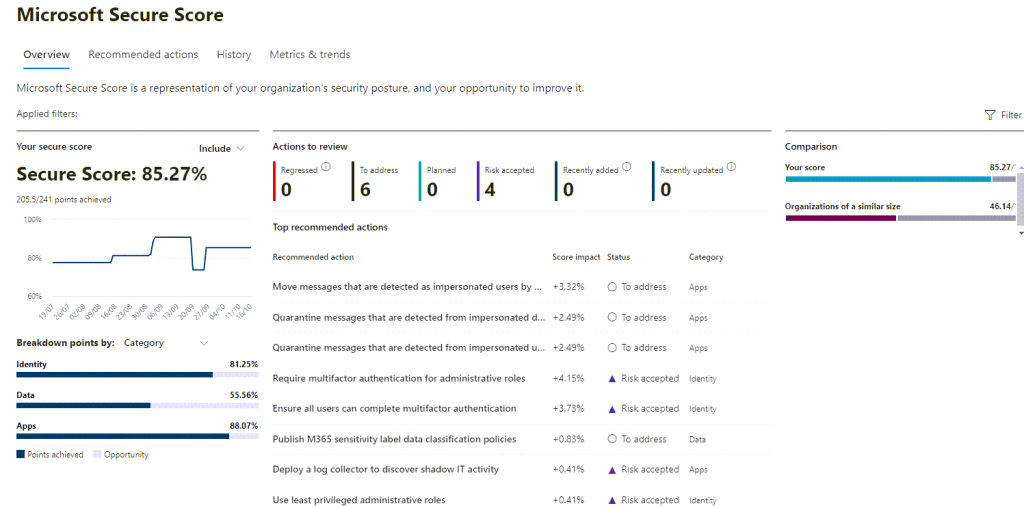
As you can see Secure Score is a real-time dashboard providing not only an overview of your Microsoft 365 security but it is also a great starting point to plan out how to improve the overall security of your organisation.
Your Microsoft Secure Score is found at: https://security.microsoft.com/securescore
You may need some administrative role access to see your Secure Score so if you cannot view it, ask your Microsoft 365 Administrator / IT support team to either grant you access or send you screenshots.
How to understand Microsoft Secure Score?
The giant number, in the above example, 85.27%, is a determination from Microsoft based on many variables, but in simple terms the main factors are:
- The number of Microsoft 365 subscriptions
- The type of Microsoft 365 subscriptions – Exchange Online mailbox, Business Basic, Business Standard, Business Premium, E5, etc.
- The number of devices (laptops, mobile phones and tablets) in your organisation that use Microsoft 365
- Which security features, policies and settings have been enabled in your Microsoft 365 system based on your highest subscription level, compared to Microsoft’s own recommended best practices.
- As Microsoft’s recommended best practices evolve over time, your Secure Score will fluctuate.
What can I use Microsoft Secure Score for?
The best part of Microsoft Secure is that you can also see a list of recommended actions that your Microsoft 365 Administration / Support team can take to improve the score.
You can also what is an achievable score based on your current subscriptions, devices, etc.
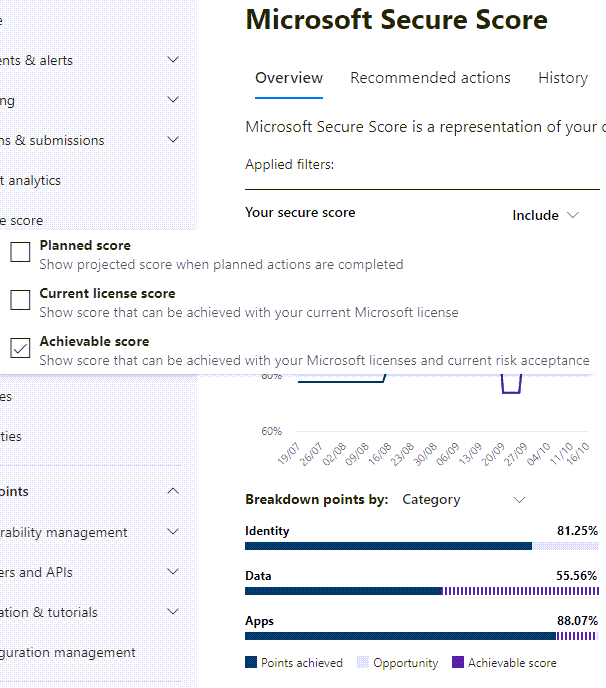
As recommended actions are considered by your organisation and then actioned, over time your Microsoft Secure Score will change, typically upwards. Mind you, this may take some time as each organisation will need to consider carefully what security features to enable, balanced against impacting the workflow and productivity of your staff.
You can also see how your Secure Score compares to other Microsoft customers of a similar size to your organisation. Considering how many Microsoft 365 customers exist globally, this comparison can be really handy as well to see how your organisation is doing regarding its security.
What is a good Microsoft Secure Score?
This is a frequently asked question since Microsoft Secure Score is simply a number.
Based on my experience:
- Anything 65% and below should be a cause for concern, and steps should be taken to have your Microsoft 365 administrators improve it.
- Anything from 65% – 80% is a good median to aim for and can be achieved without too much impact on how your organisation uses Microsoft 365 and it will meet many of Microsoft’s recommended best practices. Typically, Citisystems aims for this Secure Score for its Modern Workplace clients
- Anything from 80%-100% is an excellent score but you will need to adjust how you work with Microsoft 365 as there may some impacts on how you traditionally work.
Why should you care about Microsoft Secure Score?
Microsoft Secure Score is a great overview and is available to everyone as benchmark. There are many implications to your organisation that you may or may not have thought of:
Overall Security Improvement Plan
The Secure Score recommendations can be used as a basis to improve your organisation’s security over time, especially if Microsoft 365 is a core system for your organisation. Remember, Microsoft 365 a is cloud based service which means it is subject to cyberattacks all the time from anywhere in the world. The more secure you become, the lower the risk of problems for your organisation from these threats.
Cyberinsurance Premiums
Since Microsoft Secure Score is a known feature and many organisations now use Microsoft 365, cyberinsurance providers are now asking their customers to report their Secure Scores during annual insurance assessments.
This will affect the not only premiums you pay but also potentially the ability for your organisation to obtain cybersecurity insurance for another year.
Microsoft 365 Administrators’ capabilities
No matter who administrates your Microsoft 365, be it in-house staff, an external IT contractor, family friend or even yourself, the Secure Score is also a benchmark to work out if your system is being properly secured.
If your Microsoft 365 Administrators provide services to other customers, ask to see the Secure Score of their own organisation’s Microsoft 365. If their Secure Score is low, you should be asking why you would want them to support and secure your organisation’s Microsoft 365 as well.
Need help with Microsoft Secure Score?
Feel free to contact Citisystems or myself if you need to understand more about or if you need help improving your organisation’s Microsoft Secure Score.
 Citisystems Chronicles